Oct 27, 2026Buying Guides
Counting by Weight: What a PCS Mode Can and Cannot Do
A count mode divides batch weight by an average piece weight. This guide covers where the error hides, how resolution limits the smallest countable part, and what to test before you order.
Why count by weight at all
Hand-counting a thousand small parts is slow, and the count drifts as the hour goes on. Counting by weight takes one reading of the batch and returns a count. It suits fasteners, fittings, jewellery findings, electronic components, capsules and seeds. The instrument does not count pieces. It divides the batch weight by an average piece weight, and everything that follows — accuracy, the smallest part you can count, the capacity tier you need — comes out of that division.
How the mode gets its number
A count mode needs a reference. The operator places a known quantity on the pan, and the scale divides that weight by the quantity to obtain an average piece weight. From then on, any batch placed on the pan is reported as total weight divided by that average. The trade calls this piece counting, or PCS. The number is only as good as the reference: if the sample is not representative of the lot, every count that follows inherits the error. Confirm with the supplier what reference quantities the firmware accepts before you build a workflow around one.
Where count errors come from
Two sources dominate. The first is piece weight variation: moulded parts, castings and natural products vary unit to unit, and if the reference sample runs light against the lot, every later count reads high. The second is sample size; averaging over more pieces dilutes the effect of one heavy or light unit, so a reference of a few pieces gives a noisier average than a reference of fifty. Neither can be fixed by a better display. As a rule of thumb, if unit weight scatters by more than a few percent across the lot, count mode will not match a physical count, and the honest answer is to count by hand or add a check-weigh step.
Resolution sets the smallest countable part
Count mode cannot resolve a part that is small against the display division. On a 0.1 g display a 2 g part is twenty divisions, so one division is already five percent of the part, and a hundred-piece batch can be off by several pieces before anything else goes wrong. On a 0.01 g display the same part is two hundred divisions, and on 0.001 g it is two thousand. As a rule of thumb, keep the lightest part you intend to count at several hundred display divisions, and accept that the finer display usually comes with the lower capacity.
Capacity and resolution come as a pair
This is the trade-off buyers face. The 0.001 g ranges sit on the small pan format, up to 500 g on the DH-JCS-1 and up to 1 kg on the DH-JCS-2. The same two bodies also publish 0.01 g ranges to 3 kg on a large pan, and the DH-JCS-1 adds 0.1 g ranges to 10 kg on its square pan. One instrument can therefore cover a fine-range part and a coarse-range batch, but not at the same time — capacity and readability are defined by the configuration, so confirm which pan and capacity tier ship together. Decide where most of your volume sits before you pick a tier.
Two bodies with a documented PCS mode
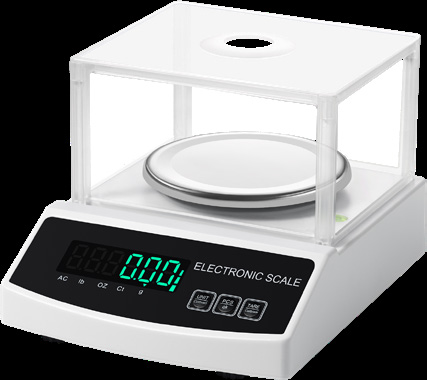
The two models whose published function lists include PCS counting are the DH-JCS-1 and the DH-JCS-2, where it sits alongside unit conversion, tare and calibration. If you have seen a count button on another model, confirm on the sample how that function works — a keypad button and a documented count mode are not the same thing.
Both JCS bodies are rechargeable, with an LCD and a charging indicator, and both list a draft shield: 17.5 x 15 x 8 cm on the DH-JCS-1, and a full glass enclosure on the DH-JCS-2 at 18.3 x 18.3 x 23.8 cm, inside a 28 x 30 x 32 cm product size that includes it. The DH-JCS-1 is the smaller body at 19 x 24 x 5.5 cm and takes three pan options.
Pan format decides what you can load
The DH-JCS-1 takes a small 9 cm round pan, a large 13 cm round pan and a square 18.2 x 15.5 cm pan; the DH-JCS-2 lists a small 9 cm round and a large 13 cm round. A tray of loose parts needs a pan wide enough that the pile does not bridge the edge, and a container needs a footprint that sits inside the pan without touching the housing. Pan format also changes with the capacity tier, so check the pan that belongs to the range you are buying rather than the smallest one in the family.
What to test on the sample bench
Take a counted batch of fifty to a hundred pieces, weigh it in count mode and compare. Repeat with a second batch drawn from a different part of the lot, because variation between batches is what breaks counting in practice, not the average of one sample. Then test the smallest part you intend to count and the heaviest batch you intend to load, and confirm the instrument accepts the reference quantity your operators will actually use. Ask what happens at overload and whether the count resets on power loss.
A short checklist before you order
Define the piece weight range and the batch size range first. Choose the display division so the lightest part stays at several hundred divisions, then check that the capacity tier covers the heaviest batch. Confirm that unit weight varies by only a few percent across a lot, and that the firmware accepts your reference quantity and your units — the two JCS bodies publish g, lb, ct and oz. Then order a sample and run the two-batch test before a production line is told to count by weight.